







HTML forms are the essential needs of almost any website viz. contact us form. A contact us form is very useful as it aids your visitors to communicate easily in a simple way. A simple form, without a captcha on it are the chief look-outs of hackers and spammers. It is essential to secure your form against all 'holes' that those hackers are searching for.
How does the spammers/hackers exploit HTML forms?
1) As a relay for sending bulk unsolicited emails.
If you are not validating your form fields (on the serve side) before sending the emails, then hackers can alter your email headers to send the bulk unsolicited emails. (also known as email injection)
2) For sending spam messages to you.
There are programs known as 'spam-bots' that leech through the web pages looking for web forms. When found, those 'bots' just fills the fields with a spam message and submits. Eventually you will start getting many hundred submissions send by those spam bots and you will find it difficult to separate genuine submissions from spam messages.
The solution for this problem is to use a mechanism to identify human submitters from 'bots'. CAPTCHA is one of such tests.
Adding Captcha
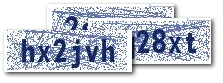
Captcha is an image with a code written on it. The website visitor is required to read the code on the image and enter the value in a text field. If the word entered is wrong, the form submission is not processed. As CAPTCHA is a smartly blurred image, the spam bot can't read it. So the form cannot be auto-submitted by a 'bot'.
Contact form with Captcha
<form method="POST" name="contact_form"
action="<?php echo htmlentities($_SERVER['PHP_SELF']); ?>">
<label for="name">Name: </label>
<input type="text" name="name"
value="<?php echo htmlentities($name) ?>">
<label for="email">Email: </label>
<input type="text" name="email"
value="<?php echo htmlentities($visitor_email) ?>">
<label for="message">Message:</label>
<textarea name="message" rows=8 cols=30>
<?php echo htmlentities($user_message) ?></textarea>
<img src="captcha_code_file.php?rand=<?php echo rand(); ?>"
id="captchaimg" >
<label for="message">Enter the code above here :</label>
<input id="6_letters_code" name="6_letters_code" type="text">
<input type="submit" value="Submit" name="submit">
</form>
The HTML form above contains the fields for name, email and message. In addition, we have the CAPTCHA image. The <img> tag for the CAPTCHA image points to the script captcha_code_file.php. The PHP script in 'captcha_code_file.php' creates the image for the captcha and saves the code in a session variable named '6_letters_code'.
Validating the CAPTCHA
When the form is submitted, we compare the value in the session variable(6_letters_code) with the submitted CAPTCHA code( the value in the text field 6_letters_code). If the codes match, then we proceed with emailing the form submission. Else we display an error.
Here is the code that does the server side processing:
if(isset($_POST['submit']))
{
if(empty($_SESSION['6_letters_code'] ) ||
strcasecmp($_SESSION['6_letters_code'], $_POST['6_letters_code']) != 0)
{
//Note: the captcha code is compared case insensitively.
//if you want case sensitive match, update the check above to
// strcmp()
$errors .= "\n The captcha code does not match!";
}
if(empty($errors))
{
//send the email
$to = $your_email;
$subject = "New form submission";
$from = $your_email;
$ip = isset($_SERVER['REMOTE_ADDR']) ? $_SERVER['REMOTE_ADDR'] : '';
$body = "A user $name submitted the contact form:\n".
"Name: $name\n".
"Email: $visitor_email \n".
"Message: \n ".
"$user_message\n".
"IP: $ip\n";
$headers = "From: $from \r\n";
$headers .= "Reply-To: $visitor_email \r\n";
mail($to, $subject, $body, $headers);
header('Location: thank-you.html');
}
}
{
if(empty($_SESSION['6_letters_code'] ) ||
strcasecmp($_SESSION['6_letters_code'], $_POST['6_letters_code']) != 0)
{
//Note: the captcha code is compared case insensitively.
//if you want case sensitive match, update the check above to
// strcmp()
$errors .= "\n The captcha code does not match!";
}
if(empty($errors))
{
//send the email
$to = $your_email;
$subject = "New form submission";
$from = $your_email;
$ip = isset($_SERVER['REMOTE_ADDR']) ? $_SERVER['REMOTE_ADDR'] : '';
$body = "A user $name submitted the contact form:\n".
"Name: $name\n".
"Email: $visitor_email \n".
"Message: \n ".
"$user_message\n".
"IP: $ip\n";
$headers = "From: $from \r\n";
$headers .= "Reply-To: $visitor_email \r\n";
mail($to, $subject, $body, $headers);
header('Location: thank-you.html');
}
}
Customizing the CAPTCHA
The CAPTCHA script in the sample code download can be customized. If you open the script, you can see the first few lines of the code as shown below:
$image_width = 120;
$image_height = 40;
$characters_on_image = 6;
$font = './monofont.ttf';
//The characters that can be used in the CAPTCHA code.
//avoid confusing characters (l 1 and i for example)
$possible_letters = '23456789bcdfghjkmnpqrstvwxyz';
$random_dots = 0;
$random_lines = 20;
$captcha_text_color = "0x142864";
$captcha_noise_color = "0x142864";
$image_height = 40;
$characters_on_image = 6;
$font = './monofont.ttf';
//The characters that can be used in the CAPTCHA code.
//avoid confusing characters (l 1 and i for example)
$possible_letters = '23456789bcdfghjkmnpqrstvwxyz';
$random_dots = 0;
$random_lines = 20;
$captcha_text_color = "0x142864";
$captcha_noise_color = "0x142864";
You can change the size of the CAPTCHA by changing $image_width & $image_height. The number of characters in the CAPTCHA can be changed by updating $characters_on_image. Similarly, the text color of the CAPTCHA can be customized by updating $captcha_text_color. The code adds some 'noise' in the image by adding random lines and dots. you can increase or decrease the noise. Please note that increasing the noise may make it difficult for your genuine visitors to read the code.

Screenshot -


