






ALT_IMG

Tutorials

Featuring short lessons and techniques, covering languages viz. PHP, MySQL, CSS, HTML, JavaScript, Java. The latest methods of developing web applications and basic tutorials of Java technology. You'll find free codes available in the post added with some video tutorials wherever applicable. Readmore...

ALT_IMG

How-To's

There went a rumour about the announcement of the Sony Xperia S and also we have seen some leaked photos of the model many time before. The latest leak photos had Sony Ericsson logo wearing on it but this final product image from CES has a Sony logo on the top Readmore..

Alt img

Tips and Tricks

Sony announces its very first mobile phone ‘Sony Xperia Ion’ in 10 years after it is being seperated from Ericsson at the CES 2012. Now the new products and devices is back with its brand logo of Sony instead of Sony Ericsson. is the first operator to have a Sony phone in the assortment Readmore...

ALT_IMG

Hacking Tricks

In the past few months we saw so many ultrabooks budding up in the electronic market. The Apple’s trendy MacBook Air gave the PC makers a cause to be anxious, since it is obvious that these thin-and-light laptops seems to be in a tough competiton with them. In general, Ultrabooks are the small, light, powerful Readmore...

ALT_IMG

Gadgets

The minute you get your hands on the Droid Xyboard, it is clear that this is a higher-caliber Android tablet while comparing with almost everything else available today. The tablet is sleek, properly balanced and felt comfortable in our hands. A completely new look, significantly enhanced performance and Readmore...

ALT_IMG

Internet Tweaks

There went a rumour about the announcement of the Sony Xperia S and also we have seen some leaked photos of the model many time before. The latest leak photos had Sony Ericsson logo wearing on it but this final product image from CES has a Sony logo on the top Readmore..

ALT_IMG

Tech News

There went a rumour about the announcement of the Sony Xperia S and also we have seen some leaked photos of the model many time before. The latest leak photos had Sony Ericsson logo wearing on it but this final product image from CES has a Sony logo on the top Readmore..

ALT_IMG

Downloads

There went a rumour about the announcement of the Sony Xperia S and also we have seen some leaked photos of the model many time before. The latest leak photos had Sony Ericsson logo wearing on it but this final product image from CES has a Sony logo on the top Readmore..

Showing posts with label PHP tutorial. Show all posts
Thursday, 27 September 2012

How To Use Captcha in HTML Forms

0 comments


HTML forms are the essential needs of almost any website viz. contact us form. A contact us form is very useful as it aids your visitors to communicate easily in a simple way. A simple form, without a captcha on it are the chief look-outs of hackers and spammers. It is essential to secure your form against all 'holes' that those hackers are searching for.


How does the spammers/hackers exploit HTML forms?

1) As a relay for sending bulk unsolicited emails.

If you are not validating your form fields (on the serve side) before sending the emails, then hackers can alter your email headers to send the bulk unsolicited emails. (also known as email injection)


2) For sending spam messages to you.

There are programs known as 'spam-bots' that leech through the web pages looking for web forms. When found, those 'bots' just fills the fields with a spam message and submits. Eventually you will start getting many hundred submissions send by those spam bots and you will find it difficult to separate genuine submissions from spam messages.

The solution for this problem is to use a mechanism to identify human submitters from 'bots'. CAPTCHA is one of such tests.


Adding Captcha
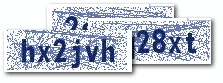

Captcha is an image with a code written on it. The website visitor is required to read the code on the image and enter the value in a text field. If the word entered is wrong, the form submission is not processed. As CAPTCHA is a smartly blurred image, the spam bot can't read it. So the form cannot be auto-submitted by a 'bot'.


Contact form with Captcha


<form method="POST" name="contact_form"
action="<?php echo htmlentities($_SERVER['PHP_SELF']); ?>">
<label for="name">Name: </label>
<input type="text" name="name"
value="<?php echo htmlentities($name) ?>">
<label for="email">Email: </label>
<input type="text" name="email"
value="<?php echo htmlentities($visitor_email) ?>">
<label for="message">Message:</label>
<textarea name="message" rows=8 cols=30>
<?php echo htmlentities($user_message) ?></textarea>
<img src="captcha_code_file.php?rand=<?php echo rand(); ?>"
id="captchaimg" >
<label for="message">Enter the code above here :</label>
<input id="6_letters_code" name="6_letters_code" type="text">
<input type="submit" value="Submit" name="submit">
</form>


The HTML form above contains the fields for name, email and message. In addition, we have the CAPTCHA image. The <img> tag for the CAPTCHA image points to the script captcha_code_file.php. The PHP script in 'captcha_code_file.php' creates the image for the captcha and saves the code in a session variable named '6_letters_code'.


Validating the CAPTCHA


When the form is submitted, we compare the value in the session variable(6_letters_code) with the submitted CAPTCHA code( the value in the text field 6_letters_code). If the codes match, then we proceed with emailing the form submission. Else we display an error.

Here is the code that does the server side processing:


if(isset($_POST['submit']))
{
  if(empty($_SESSION['6_letters_code'] ) ||
    strcasecmp($_SESSION['6_letters_code'], $_POST['6_letters_code']) != 0)
  {
   //Note: the captcha code is compared case insensitively.
   //if you want case sensitive match, update the check above to
   // strcmp()
    $errors .= "\n The captcha code does not match!";
  }
  if(empty($errors))
  {
    //send the email
    $to = $your_email;
    $subject = "New form submission";
    $from = $your_email;
    $ip = isset($_SERVER['REMOTE_ADDR']) ? $_SERVER['REMOTE_ADDR'] : '';
    $body = "A user  $name submitted the contact form:\n".
    "Name: $name\n".
    "Email: $visitor_email \n".
    "Message: \n ".
    "$user_message\n".
    "IP: $ip\n";
    $headers = "From: $from \r\n";
    $headers .= "Reply-To: $visitor_email \r\n";
    mail($to, $subject, $body, $headers);
    header('Location: thank-you.html');
  }
}


Customizing the CAPTCHA

The CAPTCHA script in the sample code download can be customized. If you open the script, you can see the first few lines of the code as shown below:


$image_width = 120;
$image_height = 40;
$characters_on_image = 6;
$font = './monofont.ttf';
//The characters that can be used in the CAPTCHA code.
//avoid confusing characters (l 1 and i for example)
$possible_letters = '23456789bcdfghjkmnpqrstvwxyz';
$random_dots = 0;
$random_lines = 20;
$captcha_text_color = "0x142864";
$captcha_noise_color = "0x142864";


You can change the size of the CAPTCHA by changing $image_width & $image_height. The number of characters in the CAPTCHA can be changed by updating $characters_on_image. Similarly, the text color of the CAPTCHA can be customized by updating $captcha_text_color. The code adds some 'noise' in the image by adding random lines and dots. you can increase or decrease the noise. Please note that increasing the noise may make it difficult for your genuine visitors to read the code.


Screenshot -


Continue reading →
Saturday, 1 September 2012

PHP: Counting Characters and Words in a File

0 comments


<?php
$file = "test.txt";

// read into string
$str = file_get_contents($file);

// count no. of characters
$numChar = strlen($str);
echo "This file has ". $numChar . " character(s)";

// count no. of characters withour spaces
$str2 = ereg_replace('[[:space:]]+', '', $str);
$numChar = strlen($str2);
echo "This file has ". $numChar . " character(s) without spaces<br/>";

// count no. of words
$numWords = str_word_count($str);
echo "This file has ". $numWords . " words";

?>


This is how the output looks:


When 'test.txt' is:


Continue reading →
Tuesday, 10 July 2012

Why PHP is better than other scripting languages?

1 comments


You will get different views with regards to the function of PHP and ASP.Net.  According to an individual, PHP is better than ASP.Net due to its ROI and open source. But another group have got more benefit than the latter. PHP is a decent language which has got a peculiar specification of object orientation as well as flexibility.  The programmers dealing with VB.NET and C# will be within the venture of switching language in the half way.  You will get inheritable classes around to avail .NET library. There will also be association with image manipulation as well as the working of XML. An individual can easily handle a lot of common task for it.


The facilities and disadvantage in PHP


The latest language known as PHP 5 has got true OOP as well as the capacity of exception handling. In order to prevent class naming collision, the language has got the disadvantage of name spacing advantage. The type checking of PHP is really very loose as compared to ASP.Net. All the variables present in PHP does not have a type.


Advantage of ASP.Net


An individual will definitely get the advantage of ASP.Net framework. There is an option of availing language inter operability. Due to this advantage, an individual can easily use any type of language. Even hit would be compatible with any preferred language of individual. It is now possible to use multiple languages in a single application by using dll.  This is generally used when you come across a big project or have an involvement of a complex team.  Here an individual will not have to upload the source code in the particular server.


The skeptics are asking themselves, "Why should I learn PHP?" The days of static Websites built with HTML files and a few CGI scripts are over: Today's sites must be dynamic.All the stale company brochures littering the streets of the Internet will transform into 24-hour virtual storefronts or be swept away. The toughest decision facing the creator of a Web application is choosing from hundreds of technologies.
Perl has adapted well to being a CGI solution and it has been used to drive complex Web technology like CyberCash and Excite's EWS search engine. Microsoft provides its Active Server Pages with Internet Information Server. Middleware like Allaire's Cold Fusion is yet another solution. ServerWatch.com lists hundreds of Web technologies, some costing tens of thousands of dollars. Why should you choose PHP over any of these alternatives?
The short answer is that PHP is better. It is faster to code and faster to execute. The same PHP code runs unaltered on different Web servers and different operation systems. Additionally, functionality that is standard with PHP is an add-on in other environments. A more detailed argument follows.
PHP is free. Anyone may visit the PHP Web site and download the complete source code. Binaries are also available for Windows. The result is easy entry into the experience. There is very little risk in trying PHP, and its license allows the code to be used to develop works with no royalties. This is unlike products such as Allaire's Cold Fusion or Everyware's Tango Enterprise that charge thousands of dollars for the software to interpret and serve scripts. Even commercial giants like Netscape and IBM now recognize the advantages of making source code available.
PHP runs on UNIX, Windows 98, Windows NT, and the Macintosh. PHP is designed to integrate with the Apache Web Server. Apache, another free technology, is the most popular Web server on the Internet and comes with source code for UNIX and Windows. Commercial flavors of Apache like WebTen and Stronghold support PHP, too. But PHP works with other Web servers, including Microsoft's Internet Information Server. Scripts may be moved between server platforms without alteration. PHP supports ISAPI to allow for the performance benefits of tightly coupling with Microsoft Web servers.
PHP is modifiable. PHP has been designed to allow for future extension of functionality. PHP is coded in C and provides a well-defined Application Programming Interface (API). Capable programmers may add new functionality easily. The rich set of functions available in PHP are evidence that they often do. Even if you aren't interested in changing the source code, it's comforting to know you can inspect it. Doing so may give you greater confidence in PHP's robustness.
PHP was written for Web page creation. Perl, C, and Java are very good general languages and are certainly capable of driving Web applications. The unfortunate sacrifice these alternatives make is the ease of communication with the Web experience. PHP applications may be rapidly and easily developed because the code is encapsulated in the Web pages themselves.
Support for PHP is free and readily available. Queries to the PHP mailing list are often answered within hours. A custom bug-tracking system on the PHP site shows each problem along with its resolution. Numerous sites, such as phpbuilder.com and zend.com, offer original content to PHP developers.
PHP is popular. Internet service providers find PHP to be an attractive way to allow their customers to code Web applications without the risks exposed by CGIs. Developers worldwide offer PHP programming. Sites coded in PHP will have the option of moving from one host to another as well as a choice of developers to add functionality.
Programming skills developed in other structured languages can be applied to PHP. PHP takes inspiration from both Perl and C. Experienced Perl and C programmers learn PHP very quickly. Likewise, programmers who learn PHP as a first language may apply their knowledge toward not only Perl and C, but other C-like languages such as Java. This is very different from learning to code in a visual editor such as Microsoft Visual InterDev.


Continue reading →
Saturday, 30 June 2012

PHP Login Script

0 comments


This requires 2 php files to be created -
1) Login.php
2) MyAccount.php


How this work -
When the user registers' with suitable username and password and uses this user details for logging in, the user is redirected to their account. If the username and password entered in incorrect, it displays an error message.


Login.php


############### CODE STARTS BELOW ###############


<?php 
include 'dbc.php';
$err = array();
foreach($_GET as $key => $value) {
$get[$key] = filter($value); //get variables are filtered.
}
//print_r($_POST);
if ($_POST['doLogin']=='Login')
{
foreach($_POST as $key => $value) {
$data[$key] = filter($value); // post variables are filtered
}
$user_email = $data['usr_email'];
$pass = $data['pwd'];
if (strpos($user_email,'@') === false) {
    $user_cond = "user_name='$user_email'";
} else {
      $user_cond = "user_email='$user_email'";    
}
$result = mysql_query("SELECT `id`,`pwd`,`full_name`,`approved`,`user_level` FROM users WHERE 
           $user_cond
AND `banned` = '0'
") or die (mysql_error()); 
$num = mysql_num_rows($result);
  // Match row found with more than 1 results  - the user is authenticated. 
    if ( $num > 0 ) { 
list($id,$pwd,$full_name,$approved,$user_level) = mysql_fetch_row($result);
if(!$approved) {
//$msg = urlencode("Account not activated. Please check your email for activation code");
$err[] = "Account not activated. Please check your email for activation code";
//header("Location: login.php?msg=$msg");
//exit();
}  
//check against salt
if ($pwd === PwdHash($pass,substr($pwd,0,9))) { 
if(empty($err)){
     // this sets session and logs user in  
       session_start();
  session_regenerate_id (true); //prevent against session fixation attacks.
  // this sets variables in the session 
$_SESSION['user_id']= $id;  
$_SESSION['user_name'] = $full_name;
$_SESSION['user_level'] = $user_level;
$_SESSION['HTTP_USER_AGENT'] = md5($_SERVER['HTTP_USER_AGENT']);
//update the timestamp and key for cookie
$stamp = time();
$ckey = GenKey();
mysql_query("update users set `ctime`='$stamp', `ckey` = '$ckey' where id='$id'") or die(mysql_error());
//set a cookie 
  if(isset($_POST['remember'])){
 setcookie("user_id", $_SESSION['user_id'], time()+60*60*24*COOKIE_TIME_OUT, "/");
 //setcookie("user_key", sha1($ckey), time()+60*60*24*COOKIE_TIME_OUT, "/");
 setcookie("user_name",$_SESSION['user_name'], time()+60*60*24*COOKIE_TIME_OUT, "/");
  }
 header("Location: myaccount.php");
}
}
else
{
//$msg = urlencode("Invalid Login. Please try again with correct user email and password. ");
$err[] = "Invalid Login. Please try again with correct user email and password.";
//header("Location: login.php?msg=$msg");
}
} else {
$err[] = "Error - Invalid login. No such user exists";
 }
} 
?>


//PHP Script ends above
//Below is the HTML form


<table width="100%" border="0" cellspacing="0" cellpadding="5" class="main">
  
  <tr> 
    <td width="160" valign="top"></td>
    <td width="732" valign="top"><p>&nbsp;</p>
      <div class="fleft paddr10" style="width:74%;text-align:justify;">


</div>  
 <p>
 <?php
 /******************** ERROR MESSAGES*************************************************
 This code is to show error messages 
 **************************************************************************/
 if(!empty($err))  {
  echo "<div class=\"msg\">";
 foreach ($err as $e) {
   echo "$e <br>";
   }
 echo "</div>";
  }
 /******************************* END ********************************/  
 ?></p>
      <form action="login.php" method="post" name="logForm" id="logForm">
        <table width="85%" border="0" cellpadding="4" cellspacing="4" class="loginform" style = "margin-left: -168px;">
          <tr> 
            <td colspan="2">&nbsp;</td>
          </tr>
          <tr> 
            <td width="28%">Username / Email:</td>
            <td width="72%"><input name="usr_email" type="text" class="required" id="txtbox" size="25"></td>
          </tr>
          <tr> 
            <td><br/>Password:</td>
            <td><br/><input name="pwd" type="password" class="required password" id="txtbox" size="25"><a href="forgot.php"><font color="#0c80af" size= "2">&nbsp;&nbsp;&nbsp;&nbsp;     Forgot Password?</font></a>  
                  </td>
          </tr>
          <tr> 
            <td colspan="2"><div align="center" style="margin-left: 170px;">
                <br/><input name="remember" type="checkbox" id="remember" value="1" style="font-size:15px;">
                <font size="2" color="000000">&nbsp;&nbsp;Remember me</font></div></td>
          </tr>
          <tr> 
            <td colspan="2"> <div align="center"> 
                <p style="margin-left: 170px;"> 
                  <br/><input name="doLogin" type="image" id="doLogin3" value="Login" src="./images/login-now.gif">
 
 <br/>
                </p><br/>
                <p style="margin-left: 170px;"><font size="2" color="000000">New User? </font><a href="register.php"><font size="2" color="0c80af">Register Now >></font></a> 
                  </p><br/>
                <p style="margin-left: 170px;"><span style="font: normal 9px verdana">Powered by Parag/Anuja/Sonali<br/></span></p><br/>
<p><span style="font-size: 12px; margin-left: 170px;"><a href=index3.php><h6 style="margin-left:170px"><font size="2" color="000000"><< Back</font></div></td></h6></a></span></p>
              </div></td>
          </tr>
        </table>
        <div align="center"></div>
        <p align="center">&nbsp; </p>
      </form>
      <p>&nbsp;</p>
  
      </td>
    <td width="196" valign="top">&nbsp;</td>
  </tr>
  <tr> 
    <td colspan="3">&nbsp;</td>
  </tr>
</table>


################# CODE ENDS ABOVE #################


MyAccount.php

############### CODE STARTS BELOW ################

<?php 
include 'dbc.php';
page_protect();
?>


<html>
<head>
<title>My Account</title>
<meta http-equiv="Content-Type" content="text/html; charset=iso-8859-1">
<body>
<table width="100%" border="0" cellspacing="0" cellpadding="5" class="main">
  <tr> 
    <td colspan="3">&nbsp;</td>
  </tr>
  <tr> 
    <td width="160" valign="top">
<?php 
/*********************** MYACCOUNT MENU ****************************
This code shows my account menu only to logged in users. 
Copy this code till END and place it in a new html or php where
you want to show myaccount options. This is only visible to logged in users
*******************************************************************/
if (isset($_SESSION['user_id'])) {?>
<div class="myaccount">
  <p><strong>My Account</strong></p>
  <a href="myaccount.php">My Account</a><br>
  <a href="mysettings.php">Settings</a><br>
    <a href="logout.php">Logout </a>
  <p>You can add more links here for users</p></div>
<?php }
if (checkAdmin()) {
/*******************************END**************************/
?>
      <p> <a href="admin.php">Admin CP </a></p>
 <?php } ?>
      <p>&nbsp;</p>
      <p>&nbsp;</p>
      <p>&nbsp;</p></td>
    <td width="732" valign="top"><p>&nbsp;</p>
      <h3 class="titlehdr">Welcome <?php echo $_SESSION['user_name'];?></h3>  
 <?php
      if (isset($_GET['msg'])) {
 echo "<div class=\"error\">$_GET[msg]</div>";
 }
   
 ?>
      <p>This is the my account page</p>

 
      </td>
    <td width="196" valign="top">&nbsp;</td>
  </tr>
  <tr> 
    <td colspan="3">&nbsp;</td>
  </tr>
</table>

</body>
</html>

################# CODE ENDS ABOVE #################


NOTE: The above scripts doesn't carry every scripts viz. admin.php, thankyou.php, etc. Also it does not include the designing scripts i.e the CSS script. Hence only using the above code won't help you in performing the login script page. Therefore, you can download the whole script package here!


Continue reading →

Database Connectivity Script in PHP

0 comments

Steps:

1) Copy the below code, open any text editor viz. Notepad++ and save as dbc.php

2) Set values inside the quotes for your MySQL settings.
    - database name
    - database user
    - database password

you will get these information from your hosting provider. Make sure you give full access rights to the database user. If you have cpanel, just login and create database and database user.

example:
define ("DB_HOST", "xxxxx"); // set database host
define ("DB_USER", "xxxx"); // set database user
define ("DB_PASS","xxxx"); // set database password
define ("DB_NAME","xxxx"); // set database name

3) Setting up reCaptcha for your Script:


   (i) Download recaptcha php library (http://recaptcha.net/plugins/php/), unzip and copy the single php file recaptchalib.php into login script folder. This is very important, without which the login script will not work.

   (ii) Go to recaptcha.net, register a free account, and you will get public and private keys. Make a note of that and set it here inside dbc.php
$publickey = "xxxxxxxxxxxxxxxxxxxxxxxxxxx"
$privatekey = "xxxxxxxxxxxxxxxxxxxxxxxxx";


4) Configuration settings:

(i) Automatic or Manual registration

/* Registration Type (Automatic or Manual)
1 -> Automatic Registration (Users will receive activation code and they will be automatically approved after clicking activation link)
0 -> Manual Approval (Users will not receive activation code and you will need to approve every user manually)
*/
$user_registration = 1; // set 0 or 1

(ii) Other Settings (optional only)
These are the other settings in the script if you want you can change it like cookie expiry time, specify admin levels and much more..

define("COOKIE_TIME_OUT", 10); //specify cookie timeout in days (default is 10 days)
define('SALT_LENGTH', 9); // salt for password


****************CODE BEGINS BELOW**********************


<?php
/************* MYSQL DATABASE SETTINGS *****************
1. Specify Database name in $dbname
2. MySQL host (localhost or remotehost)
3. MySQL user name with ALL previleges assigned.
4. MySQL password
Note: If you use cpanel, the name will be like account_database
*************************************************************/
define ("DB_HOST", "xxxxxx"); // set database host
define ("DB_USER", "xxxxxx"); // set database user
define ("DB_PASS","xxxxxx"); // set database password
define ("DB_NAME","xxxxx"); // set database name
error_reporting(E_ALL ^ E_NOTICE);
$link = mysql_connect(DB_HOST, DB_USER, DB_PASS) or die("Couldn't make connection.");
$db = mysql_select_db(DB_NAME, $link) or die("Couldn't select database");
/* Registration Type (Automatic or Manual) 
 1 -> Automatic Registration (Users will receive activation code and they will be automatically approved after clicking activation link)
 0 -> Manual Approval (Users will not receive activation code and you will need to approve every user manually)
*/
$user_registration = 1;  // set 0 or 1
define("COOKIE_TIME_OUT", 10); //specify cookie timeout in days (default is 10 days)
define('SALT_LENGTH', 9); // salt for password
//define ("ADMIN_NAME", "admin"); // sp
/* Specify user levels */
define ("ADMIN_LEVEL", 5);
define ("USER_LEVEL", 1);
define ("GUEST_LEVEL", 0);
/*************** reCAPTCHA KEYS****************/
$publickey = "xxxxxxxxxxxxxxxxxxxxxxxxxxxxxxxxx";
$privatekey = "xxxxxxxxxxxxxxxxxxxxxxxxxxxxxxxx";
/**** PAGE PROTECT CODE  ********************************
This code protects pages to only logged in users. If users have not logged in then it will redirect to login page.
If you want to add a new page and want to login protect, COPY this from this to END marker.
Remember this code must be placed on very top of any html or php page.
********************************************************/
function page_protect() {
session_start();
global $db; 
/* Secure against Session Hijacking by checking user agent */
if (isset($_SESSION['HTTP_USER_AGENT'])){
    if ($_SESSION['HTTP_USER_AGENT'] != md5($_SERVER['HTTP_USER_AGENT']))
    {
        logout();
        exit;
    }
}
// before we allow sessions, we need to check authentication key - ckey and ctime stored in database
/* If session not set, check for cookies set by Remember me */
if (!isset($_SESSION['user_id']) && !isset($_SESSION['user_name']) ) 
{
if(isset($_COOKIE['user_id']) && isset($_COOKIE['user_key'])){
/* we double check cookie expiry time against stored in database */
$cookie_user_id  = filter($_COOKIE['user_id']);
$rs_ctime = mysql_query("select `ckey`,`ctime` from `users` where `id` ='$cookie_user_id'") or die(mysql_error());
list($ckey,$ctime) = mysql_fetch_row($rs_ctime);
// coookie expiry
if( (time() - $ctime) > 60*60*24*COOKIE_TIME_OUT) {
logout();
}
/* Security check with untrusted cookies - dont trust value stored in cookie.
/* We also do authentication check of the `ckey` stored in cookie matches that stored in database during login*/
if( !empty($ckey) && is_numeric($_COOKIE['user_id']) && isUserID($_COOKIE['user_name']) && $_COOKIE['user_key'] == sha1($ckey)  ) {
 session_regenerate_id(); //against session fixation attacks.
 $_SESSION['user_id'] = $_COOKIE['user_id'];
 $_SESSION['user_name'] = $_COOKIE['user_name'];
/* query user level from database instead of storing in cookies */
 list($user_level) = mysql_fetch_row(mysql_query("select user_level from users where id='$_SESSION[user_id]'"));
 $_SESSION['user_level'] = $user_level;
 $_SESSION['HTTP_USER_AGENT'] = md5($_SERVER['HTTP_USER_AGENT']);   
  } else {
  logout();
  }
  } else {
header("Location: login.php");
exit();
}
}
}
function filter($data) {
$data = trim(htmlentities(strip_tags($data)));
if (get_magic_quotes_gpc())
$data = stripslashes($data);
$data = mysql_real_escape_string($data);
return $data;
}
function EncodeURL($url)
{
$new = strtolower(ereg_replace(' ','_',$url));
return($new);
}
function DecodeURL($url)
{
$new = ucwords(ereg_replace('_',' ',$url));
return($new);
}
function ChopStr($str, $len) 
{
    if (strlen($str) < $len)
        return $str;
    $str = substr($str,0,$len);
    if ($spc_pos = strrpos($str," "))
            $str = substr($str,0,$spc_pos);
    return $str . "...";
}
function isEmail($email){
  return preg_match('/^\S+@[\w\d.-]{2,}\.[\w]{2,6}$/iU', $email) ? TRUE : FALSE;
}
function isUserID($username)
{
if (preg_match('/^[a-z\d_]{5,20}$/i', $username)) {
return true;
} else {
return false;
}
 } 
function isURL($url) 
{
if (preg_match('/^(http|https|ftp):\/\/([A-Z0-9][A-Z0-9_-]*(?:\.[A-Z0-9][A-Z0-9_-]*)+):?(\d+)?\/?/i', $url)) {
return true;
} else {
return false;
}
} 
function checkPwd($x,$y) 
{
if(empty($x) || empty($y) ) { return false; }
if (strlen($x) < 4 || strlen($y) < 4) { return false; }


if (strcmp($x,$y) != 0) {
 return false;
 } 
return true;
}
function GenPwd($length = 7)
{
  $password = "";
  $possible = "0123456789bcdfghjkmnpqrstvwxyz"; //no vowels
  
  $i = 0; 
    
  while ($i < $length) {    
    $char = substr($possible, mt_rand(0, strlen($possible)-1), 1);
    if (!strstr($password, $char)) { 
      $password .= $char;
      $i++;
    }
  }
  return $password;
}
function GenKey($length = 7)
{
  $password = "";
  $possible = "0123456789abcdefghijkmnopqrstuvwxyz"; 
  $i = 0;   
  while ($i < $length) {  
    $char = substr($possible, mt_rand(0, strlen($possible)-1), 1);         
    if (!strstr($password, $char)) { 
      $password .= $char;
      $i++;
    }
  }
  return $password;
}
function logout()
{
global $db;
session_start();
if(isset($_SESSION['user_id']) || isset($_COOKIE['user_id'])) {
mysql_query("update `users` 
set `ckey`= '', `ctime`= '' 
where `id`='$_SESSION[user_id]' OR  `id` = '$_COOKIE[user_id]'") or die(mysql_error());
}
/************ Delete the sessions****************/
unset($_SESSION['user_id']);
unset($_SESSION['user_name']);
unset($_SESSION['user_level']);
unset($_SESSION['HTTP_USER_AGENT']);
session_unset();
session_destroy(); 
/* Delete the cookies*******************/
setcookie("user_id", '', time()-60*60*24*COOKIE_TIME_OUT, "/");
setcookie("user_name", '', time()-60*60*24*COOKIE_TIME_OUT, "/");
setcookie("user_key", '', time()-60*60*24*COOKIE_TIME_OUT, "/");
header("Location: login.php");
}
// Password and salt generation
function PwdHash($pwd, $salt = null)
{
    if ($salt === null)     {
        $salt = substr(md5(uniqid(rand(), true)), 0, SALT_LENGTH);
    }
    else     {
        $salt = substr($salt, 0, SALT_LENGTH);
    }
    return $salt . sha1($pwd . $salt);
}
function checkAdmin() {


if($_SESSION['user_level'] == ADMIN_LEVEL) {
return 1;
} else { return 0 ;
}
}
?>


*******************CODE ENDS ABOVE*************************


Continue reading →