






ALT_IMG

Tutorials

Featuring short lessons and techniques, covering languages viz. PHP, MySQL, CSS, HTML, JavaScript, Java. The latest methods of developing web applications and basic tutorials of Java technology. You'll find free codes available in the post added with some video tutorials wherever applicable. Readmore...

ALT_IMG

How-To's

There went a rumour about the announcement of the Sony Xperia S and also we have seen some leaked photos of the model many time before. The latest leak photos had Sony Ericsson logo wearing on it but this final product image from CES has a Sony logo on the top Readmore..

Alt img

Tips and Tricks

Sony announces its very first mobile phone ‘Sony Xperia Ion’ in 10 years after it is being seperated from Ericsson at the CES 2012. Now the new products and devices is back with its brand logo of Sony instead of Sony Ericsson. is the first operator to have a Sony phone in the assortment Readmore...

ALT_IMG

Hacking Tricks

In the past few months we saw so many ultrabooks budding up in the electronic market. The Apple’s trendy MacBook Air gave the PC makers a cause to be anxious, since it is obvious that these thin-and-light laptops seems to be in a tough competiton with them. In general, Ultrabooks are the small, light, powerful Readmore...

ALT_IMG

Gadgets

The minute you get your hands on the Droid Xyboard, it is clear that this is a higher-caliber Android tablet while comparing with almost everything else available today. The tablet is sleek, properly balanced and felt comfortable in our hands. A completely new look, significantly enhanced performance and Readmore...

ALT_IMG

Internet Tweaks

There went a rumour about the announcement of the Sony Xperia S and also we have seen some leaked photos of the model many time before. The latest leak photos had Sony Ericsson logo wearing on it but this final product image from CES has a Sony logo on the top Readmore..

ALT_IMG

Tech News

There went a rumour about the announcement of the Sony Xperia S and also we have seen some leaked photos of the model many time before. The latest leak photos had Sony Ericsson logo wearing on it but this final product image from CES has a Sony logo on the top Readmore..

ALT_IMG

Downloads

There went a rumour about the announcement of the Sony Xperia S and also we have seen some leaked photos of the model many time before. The latest leak photos had Sony Ericsson logo wearing on it but this final product image from CES has a Sony logo on the top Readmore..

Showing posts with label Tutorial. Show all posts
Thursday, 27 September 2012

How To Use Captcha in HTML Forms

0 comments


HTML forms are the essential needs of almost any website viz. contact us form. A contact us form is very useful as it aids your visitors to communicate easily in a simple way. A simple form, without a captcha on it are the chief look-outs of hackers and spammers. It is essential to secure your form against all 'holes' that those hackers are searching for.


How does the spammers/hackers exploit HTML forms?

1) As a relay for sending bulk unsolicited emails.

If you are not validating your form fields (on the serve side) before sending the emails, then hackers can alter your email headers to send the bulk unsolicited emails. (also known as email injection)


2) For sending spam messages to you.

There are programs known as 'spam-bots' that leech through the web pages looking for web forms. When found, those 'bots' just fills the fields with a spam message and submits. Eventually you will start getting many hundred submissions send by those spam bots and you will find it difficult to separate genuine submissions from spam messages.

The solution for this problem is to use a mechanism to identify human submitters from 'bots'. CAPTCHA is one of such tests.


Adding Captcha
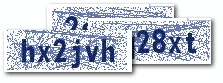

Captcha is an image with a code written on it. The website visitor is required to read the code on the image and enter the value in a text field. If the word entered is wrong, the form submission is not processed. As CAPTCHA is a smartly blurred image, the spam bot can't read it. So the form cannot be auto-submitted by a 'bot'.


Contact form with Captcha


<form method="POST" name="contact_form"
action="<?php echo htmlentities($_SERVER['PHP_SELF']); ?>">
<label for="name">Name: </label>
<input type="text" name="name"
value="<?php echo htmlentities($name) ?>">
<label for="email">Email: </label>
<input type="text" name="email"
value="<?php echo htmlentities($visitor_email) ?>">
<label for="message">Message:</label>
<textarea name="message" rows=8 cols=30>
<?php echo htmlentities($user_message) ?></textarea>
<img src="captcha_code_file.php?rand=<?php echo rand(); ?>"
id="captchaimg" >
<label for="message">Enter the code above here :</label>
<input id="6_letters_code" name="6_letters_code" type="text">
<input type="submit" value="Submit" name="submit">
</form>


The HTML form above contains the fields for name, email and message. In addition, we have the CAPTCHA image. The <img> tag for the CAPTCHA image points to the script captcha_code_file.php. The PHP script in 'captcha_code_file.php' creates the image for the captcha and saves the code in a session variable named '6_letters_code'.


Validating the CAPTCHA


When the form is submitted, we compare the value in the session variable(6_letters_code) with the submitted CAPTCHA code( the value in the text field 6_letters_code). If the codes match, then we proceed with emailing the form submission. Else we display an error.

Here is the code that does the server side processing:


if(isset($_POST['submit']))
{
  if(empty($_SESSION['6_letters_code'] ) ||
    strcasecmp($_SESSION['6_letters_code'], $_POST['6_letters_code']) != 0)
  {
   //Note: the captcha code is compared case insensitively.
   //if you want case sensitive match, update the check above to
   // strcmp()
    $errors .= "\n The captcha code does not match!";
  }
  if(empty($errors))
  {
    //send the email
    $to = $your_email;
    $subject = "New form submission";
    $from = $your_email;
    $ip = isset($_SERVER['REMOTE_ADDR']) ? $_SERVER['REMOTE_ADDR'] : '';
    $body = "A user  $name submitted the contact form:\n".
    "Name: $name\n".
    "Email: $visitor_email \n".
    "Message: \n ".
    "$user_message\n".
    "IP: $ip\n";
    $headers = "From: $from \r\n";
    $headers .= "Reply-To: $visitor_email \r\n";
    mail($to, $subject, $body, $headers);
    header('Location: thank-you.html');
  }
}


Customizing the CAPTCHA

The CAPTCHA script in the sample code download can be customized. If you open the script, you can see the first few lines of the code as shown below:


$image_width = 120;
$image_height = 40;
$characters_on_image = 6;
$font = './monofont.ttf';
//The characters that can be used in the CAPTCHA code.
//avoid confusing characters (l 1 and i for example)
$possible_letters = '23456789bcdfghjkmnpqrstvwxyz';
$random_dots = 0;
$random_lines = 20;
$captcha_text_color = "0x142864";
$captcha_noise_color = "0x142864";


You can change the size of the CAPTCHA by changing $image_width & $image_height. The number of characters in the CAPTCHA can be changed by updating $characters_on_image. Similarly, the text color of the CAPTCHA can be customized by updating $captcha_text_color. The code adds some 'noise' in the image by adding random lines and dots. you can increase or decrease the noise. Please note that increasing the noise may make it difficult for your genuine visitors to read the code.


Screenshot -


Continue reading →
Tuesday, 25 September 2012

How to Create a Horizontal Dropdown Menu with HTML, CSS and jQuery

1 comments


Menus play an essential part on the web. They allow users to find their bearings and help them navigate your website. When designing menus, usability is the key.

Beginners often struggle with the basics. In this tutorial I'm going to show you how to create a simple, usable and functional horizontal menu with HTML and CSS. I will also dive a little bit into jQuery to add animations to your menu.

This tutorial assumes you have a basic knowledge of HTML and CSS. It’s recommended to use a CSS reset for consistency. I use the one by HTML5Doctor.


The Basics


Let's start with the basic HTML structure of the menu:


<ul id="coolMenu">
<li><a href="#">Home</a></li>
<li><a href="#">Tutorials</a></li>
<li><a href="#">Gadgets</a></li>
<li><a href="#">Tips and Tricks</a></li>
<li><a href="#">Contact us</a></li>
</ul>


A menu consists of an unordered list, and each list item contains a link with the text. Don’t create unnecessary divs. You don’t need any.

To add a sub menu simply nest another unordered list inside the item that's going to have the sub menu, like this:


<ul id="coolMenu">
<li><a href="#">Home</a></li>
<li>
            <a href="#">Tutorials</a>
            <ul>
        <li><a href="#">PHP</a></li>
        <li><a href="#">MySQL</a></li>
        <li><a href="#">JavaScript</a></li>
        <li><a href="#">HTML</a></li>
        <li><a href="#">CSS</a></li>
        <li><a href="#">jQuery</a></li>
        <li><a href="#">Java</a></li>
    </ul>
        </li>
<li><a href="#">Gadgets</a></li>
<li><a href="#">Tips and Tricks</a></li>
<li><a href="#">Contact us</a></li>
</ul>


As you can see, creating the structure is very simple. This is how it should look in your browser at this stage:


There are multiple ways to set up the CSS for a horizontal menu. After many years I found that this is the quickest and cleanest way to do it:


#coolMenu,
#coolMenu ul {
    list-style: none;
}
#coolMenu {
    float: left;
}
#coolMenu > li {
    float: left;
}
#coolMenu li a {
    display: block;
    height: 2em;
    line-height: 2em;
    padding: 0 1.5em;
    text-decoration: none;
}
#coolMenu ul {
    position: absolute;
    display: none;
    z-index: 999;
}
#coolMenu ul li a {
    width: 80px;
}
#coolMenu li:hover ul {
    display: block;
}


  • I decided to float the whole menu to contain it but you can use overflow hidden or even set a fixed width for the same purpose.
  • It is important to float the list elements rather than the links.
  • The links should be displayed as blocks, otherwise, they won’t behave as expected.
  • Absolute position the submenu and hide it to remove it from the regular flow and make it invisible. Also, set a high z-index to prevent the submenu from showing behind other elements.
  • Set a height for the link elements and the line-height equal to the height to center the text vertically. By specifying a fixed height instead of just using padding you avoid flickering problems with jQuery animations later on.
  • Even though it’s not necessary to set a fixed width for the submenu items, it’s always a good practice. It allows you to style them more consistently later on.
  • Notice that the hover state is set on the list element and not the link.


With all this set, the menu should be already working. Try opening it in your browser and hovering over the third option to show the sub menu.


Improving Usability


This step will cover how to style the menu with some basic CSS to make it more accessible.


/* Main menu
------------------------------------------*/
#coolMenu {
    font-family: Arial;
    font-size: 12px;
    background: #2f8be8;
}
#coolMenu > li > a {
    color: #fff;
    font-weight: bold;
}
#coolMenu > li:hover > a {
    background: #f09d28;
    color: #000;
}

/* Submenu
------------------------------------------*/
#coolMenu ul {
    background: #f09d28;
}
#coolMenu ul li a {
    color: #000;
}
#coolMenu ul li:hover a {
    background: #ffc97c;
}


Keep in mind this is very basic, and is meant to be just an example. You can style this however you want. The important thing to remember here is, as I mentioned before that the hover states, are styled in the list items and not the links.

This is how the menu looks so far:


Adding Animations


This final step is not necessary but it’ll help you add animations to your menu with simple jQuery. The first thing you need to do, of course, is to call the latest jQuery plugin on your website:


Now, let’s add a "noJS" class to the submenu to be able to unhook the hover css state in jQuery. This will also ensure that the menu will still work when javascript is disabled.


<li>
    <a href="#">Tutorials</a>
    <ul class="noJS">
<li><a href="#">PHP</a></li>
<li><a href="#">MySQL</a></li>
<li><a href="#">JavaScript</a></li>
<li><a href="#">HTML</a></li>
<li><a href="#">CSS</a></li>
<li><a href="#">jQuery</a></li>
<li><a href="#">Java</a></li>
   </ul>
</li>


You also need to add the class to the sub menu CSS hover state:


#coolMenu li:hover ul.noJS {
    display: block; 
}


Now that everything is set let’s add some magic:


$(function(){
    $('#coolMenu').find('> li').hover(function(){
        $(this).find('ul')
        .removeClass('noJS')
        .stop(true, true).slideToggle('fast');
    });
});

The code is pretty explanatory. The script finds the immediate children list items and adds a hover function. Inside the function it removes the "noJS" class since we’re using JavaScript, and then it tells the menu to slide down on hover and to slide up on un-hover. This is achieved with the slideToggle function. The stop function prevents the animation from repeating itself if we hover multiple times.


Continue reading →
Sunday, 9 September 2012

CSS Tip: Resetting Your Styles with CSS Reset

0 comments


Resetting your styles, commonly referred to as CSS Reset or Reset CSS is the process of resetting (or more accurately – setting) the styles of all elements to a baseline value so that you avoid cross-browser differences due to their built-in default style settings. By resetting your styles, you avoid defaulting to the browser’s built-in styles, which differs from browser to browser.


CSS Reset avoids browser inconsistencies

For example, say you use an anchor tag <a> in your HTML document. Usually, browsers like Internet Explorer and Firefox will render it as blue and underlined.

But five years from now, someone decides to release a new browser (let’s call it UltraBrowser) and they decide that they don’t like blue, underlined links – so instead they set the default style of <a> tags to red and boldfaced. If you always set a baseline value for your <a> elements, then you’re guaranteed that it will always be the same, regardless of what UltraBrowser thinks <a> elements should look like.


A simple example

Example 1: How paragraph tags are rendered by default.

In Example 1, I’ve placed three unstyled paragraphs <p> inside a container <div> (I gave the container div a blue background and orange border to highlight the difference).
By default, in Firefox, you’ll see that there’s a space in between the top of the first paragraph and the top of the container div, and a space between the bottom of the last paragraph and the bottom of the container div.

By default, these spaces don’t exist in Internet Explorer.

So which browser is right, Firefox or IE? It doesn’t matter. What does matter is that the spacing in between your paragraphs and other elements will look dissimilar if you don’t set a style for a paragraph’s margin and padding.

Of course that’s a rather simplified example. In practice, CSS Reset is important in removing inconsistent margins, paddings, line-heights, and other attributes that can cause your web pages to look differently across various browsers.

So that’s the basic theory of resetting your styles which just means you set your style rules for all elements to avoid having the browser do it for you.

The below CSS Reset code has been taken from HTML5Doctor. It’s recommended to use a CSS reset for consistency.

/* 
html5doctor.com Reset Stylesheet
v1.6.1
Last Updated: 2010-09-17
Author: Richard Clark - http://richclarkdesign.com 
Twitter: @rich_clark
*/

html, body, div, span, object, iframe,
h1, h2, h3, h4, h5, h6, p, blockquote, pre,
abbr, address, cite, code,
del, dfn, em, img, ins, kbd, q, samp,
small, strong, sub, sup, var,
b, i,
dl, dt, dd, ol, ul, li,
fieldset, form, label, legend,
table, caption, tbody, tfoot, thead, tr, th, td,
article, aside, canvas, details, figcaption, figure, 
footer, header, hgroup, menu, nav, section, summary,
time, mark, audio, video {
    margin:0;
    padding:0;
    border:0;
    outline:0;
    font-size:100%;
    vertical-align:baseline;
    background:transparent;
}

body {
    line-height:1;
}

article,aside,details,figcaption,figure,
footer,header,hgroup,menu,nav,section { 
 display:block;
}

nav ul {
    list-style:none;
}

blockquote, q {
    quotes:none;
}

blockquote:before, blockquote:after,
q:before, q:after {
    content:'';
    content:none;
}

a {
    margin:0;
    padding:0;
    font-size:100%;
    vertical-align:baseline;
    background:transparent;
}

/* change colours to suit your needs */
ins {
    background-color:#ff9;
    color:#000;
    text-decoration:none;
}

/* change colours to suit your needs */
mark {
    background-color:#ff9;
    color:#000; 
    font-style:italic;
    font-weight:bold;
}

del {
    text-decoration: line-through;
}

abbr[title], dfn[title] {
    border-bottom:1px dotted;
    cursor:help;
}

table {
    border-collapse:collapse;
    border-spacing:0;
}

/* change border colour to suit your needs */
hr {
    display:block;
    height:1px;
    border:0;   
    border-top:1px solid #cccccc;
    margin:1em 0;
    padding:0;
}

input, select {
    vertical-align:middle;
}


Continue reading →
Saturday, 1 September 2012

PHP: Counting Characters and Words in a File

0 comments


<?php
$file = "test.txt";

// read into string
$str = file_get_contents($file);

// count no. of characters
$numChar = strlen($str);
echo "This file has ". $numChar . " character(s)";

// count no. of characters withour spaces
$str2 = ereg_replace('[[:space:]]+', '', $str);
$numChar = strlen($str2);
echo "This file has ". $numChar . " character(s) without spaces<br/>";

// count no. of words
$numWords = str_word_count($str);
echo "This file has ". $numWords . " words";

?>


This is how the output looks:


When 'test.txt' is:


Continue reading →
Monday, 27 August 2012

HTML Forms: Using "div" tag instead of "table" tag

2 comments


Name:
Age:
Shoe size:
Comments:


The CSS looks like this:      


div.row {
  clear: both;
  padding-top: 5px;
  }

div.row span.label {
  float: left;
  width: 100px;
  text-align: right;
  }

div.row span.formw {
  float: right;
  width: 235px;
  text-align: left;
  } 
div.spacer {
  clear: both;
  }


The HTML looks like this:


<div style="width: 360px; background-color: #ccc;
border: 1px dotted #333; padding: 5px;
margin: 0px auto;">
  <form>
    <div class="row">
      <span class="label">Name:</span>
      <span class="formw"><input type="text" size="25" /></span>
    </div>

    <div class="row">
      <span class="label">Age:</span>
      <span class="formw"><input type="text" size="25" /></span>
    </div>

    <div class="row">
      <span class="label">Shoe size:</span>
      <span class="formw"><input type="text" size="25" /></span>
    </div>

    <div class="row">
      <span class="label">Comments:</span>
      <span class="formw">
        <textarea cols="25" rows="8">
        Go ahead - write something...
        </textarea>
      </span>
    </div>

  <div class="spacer">
  &nbsp;
  </div>
 </form>

</div>


Continue reading →
Tuesday, 10 July 2012

Why PHP is better than other scripting languages?

1 comments


You will get different views with regards to the function of PHP and ASP.Net.  According to an individual, PHP is better than ASP.Net due to its ROI and open source. But another group have got more benefit than the latter. PHP is a decent language which has got a peculiar specification of object orientation as well as flexibility.  The programmers dealing with VB.NET and C# will be within the venture of switching language in the half way.  You will get inheritable classes around to avail .NET library. There will also be association with image manipulation as well as the working of XML. An individual can easily handle a lot of common task for it.


The facilities and disadvantage in PHP


The latest language known as PHP 5 has got true OOP as well as the capacity of exception handling. In order to prevent class naming collision, the language has got the disadvantage of name spacing advantage. The type checking of PHP is really very loose as compared to ASP.Net. All the variables present in PHP does not have a type.


Advantage of ASP.Net


An individual will definitely get the advantage of ASP.Net framework. There is an option of availing language inter operability. Due to this advantage, an individual can easily use any type of language. Even hit would be compatible with any preferred language of individual. It is now possible to use multiple languages in a single application by using dll.  This is generally used when you come across a big project or have an involvement of a complex team.  Here an individual will not have to upload the source code in the particular server.


The skeptics are asking themselves, "Why should I learn PHP?" The days of static Websites built with HTML files and a few CGI scripts are over: Today's sites must be dynamic.All the stale company brochures littering the streets of the Internet will transform into 24-hour virtual storefronts or be swept away. The toughest decision facing the creator of a Web application is choosing from hundreds of technologies.
Perl has adapted well to being a CGI solution and it has been used to drive complex Web technology like CyberCash and Excite's EWS search engine. Microsoft provides its Active Server Pages with Internet Information Server. Middleware like Allaire's Cold Fusion is yet another solution. ServerWatch.com lists hundreds of Web technologies, some costing tens of thousands of dollars. Why should you choose PHP over any of these alternatives?
The short answer is that PHP is better. It is faster to code and faster to execute. The same PHP code runs unaltered on different Web servers and different operation systems. Additionally, functionality that is standard with PHP is an add-on in other environments. A more detailed argument follows.
PHP is free. Anyone may visit the PHP Web site and download the complete source code. Binaries are also available for Windows. The result is easy entry into the experience. There is very little risk in trying PHP, and its license allows the code to be used to develop works with no royalties. This is unlike products such as Allaire's Cold Fusion or Everyware's Tango Enterprise that charge thousands of dollars for the software to interpret and serve scripts. Even commercial giants like Netscape and IBM now recognize the advantages of making source code available.
PHP runs on UNIX, Windows 98, Windows NT, and the Macintosh. PHP is designed to integrate with the Apache Web Server. Apache, another free technology, is the most popular Web server on the Internet and comes with source code for UNIX and Windows. Commercial flavors of Apache like WebTen and Stronghold support PHP, too. But PHP works with other Web servers, including Microsoft's Internet Information Server. Scripts may be moved between server platforms without alteration. PHP supports ISAPI to allow for the performance benefits of tightly coupling with Microsoft Web servers.
PHP is modifiable. PHP has been designed to allow for future extension of functionality. PHP is coded in C and provides a well-defined Application Programming Interface (API). Capable programmers may add new functionality easily. The rich set of functions available in PHP are evidence that they often do. Even if you aren't interested in changing the source code, it's comforting to know you can inspect it. Doing so may give you greater confidence in PHP's robustness.
PHP was written for Web page creation. Perl, C, and Java are very good general languages and are certainly capable of driving Web applications. The unfortunate sacrifice these alternatives make is the ease of communication with the Web experience. PHP applications may be rapidly and easily developed because the code is encapsulated in the Web pages themselves.
Support for PHP is free and readily available. Queries to the PHP mailing list are often answered within hours. A custom bug-tracking system on the PHP site shows each problem along with its resolution. Numerous sites, such as phpbuilder.com and zend.com, offer original content to PHP developers.
PHP is popular. Internet service providers find PHP to be an attractive way to allow their customers to code Web applications without the risks exposed by CGIs. Developers worldwide offer PHP programming. Sites coded in PHP will have the option of moving from one host to another as well as a choice of developers to add functionality.
Programming skills developed in other structured languages can be applied to PHP. PHP takes inspiration from both Perl and C. Experienced Perl and C programmers learn PHP very quickly. Likewise, programmers who learn PHP as a first language may apply their knowledge toward not only Perl and C, but other C-like languages such as Java. This is very different from learning to code in a visual editor such as Microsoft Visual InterDev.


Continue reading →